
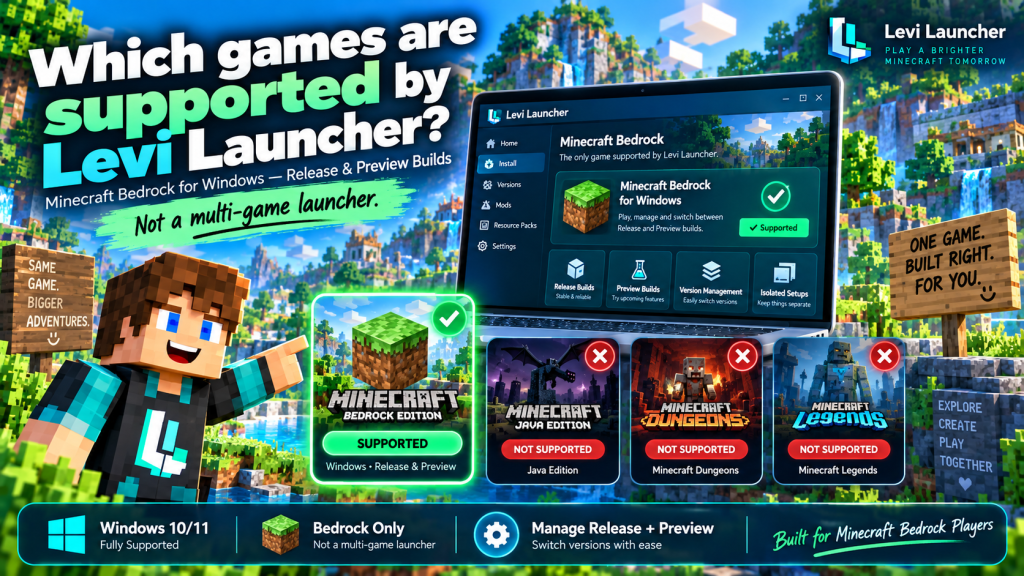
Levi Launcher is specifically designed for Minecraft Bedrock Edition (GDK) on Windows, rather than working as a general-purpose launcher for many different games. Its main purpose is to help Minecraft Bedrock players install, manage, isolate, modify, and launch different versions of the game from one organized desktop application.
If you are wondering which games are supported by Levi Launcher, the answer is simple: its official Windows version focuses on Minecraft Bedrock Edition. However, it supports different types of Minecraft builds and includes several management tools that make it easier to organize multiple Bedrock environments.
Minecraft Bedrock Edition Is the Main Supported Game
Levi Launcher is primarily built for Minecraft Bedrock Edition (GDK) on Windows. This means its tools, installation system, version controls, and other features are designed specifically around the Bedrock version of Minecraft.
GDK refers to the modern Windows environment used by Minecraft Bedrock with Microsoft’s gaming infrastructure. Levi Launcher provides an alternative way to organize and manage this version without turning it into a different game or replacing the original Minecraft experience.
A Minecraft License Is Still Required
Using Levi Launcher does not provide ownership of Minecraft. Players still need a legitimate licensed copy of Minecraft Bedrock Edition associated with their Microsoft account.
The launcher works as a management tool for an existing game license rather than as a way to obtain Minecraft for free.
Stable Minecraft Release Builds Are Supported
One of the main capabilities of Levi Launcher is support for standard Minecraft Release builds. These are the regular versions intended for everyday gameplay and are generally the most suitable choice for players who want a stable experience.
Release versions are commonly used for activities such as:
- Survival worlds
- Regular multiplayer
- Established resource packs
- Long-term Minecraft setups
- More predictable mod compatibility
Inside Levi Launcher, users can install and organize supported Release versions instead of depending entirely on one current Minecraft installation.
Manage Multiple Release Versions
The launcher provides version-management tools that allow players to install, rename, launch, and remove different Minecraft builds.
This can be especially useful when a player needs a particular Minecraft version because of world compatibility, resource packs, mods, or another setup that works better with a specific release.
Minecraft Preview Builds Can Also Be Managed
Levi Launcher is not limited to stable versions. It also supports Minecraft Preview builds, giving players another option when they want to experiment with upcoming Minecraft features.
Minecraft Preview allows users to experience changes and features before they become part of the normal stable release. Through Levi Launcher, players can choose between Release and Preview builds while creating or managing their Minecraft installations.
Preview Builds Are Better for Testing
Preview versions are mainly intended for experimentation rather than long-term everyday gameplay. They may include unfinished features, compatibility changes, or bugs that are less common in stable releases.
For this reason, keeping Preview installations separate from a normal Minecraft environment is usually a sensible approach, particularly when important worlds are involved.
Different Minecraft Versions Can Be Kept Separate
Although Levi Launcher supports one main game, it can manage multiple versions and configurations of that game. This distinction is important when understanding what the launcher actually supports.
Seeing several installations inside Levi Launcher does not mean the application supports several different games. Those entries represent different builds, versions, or configurations of Minecraft Bedrock Edition.
Use Isolation for Separate Setups
Levi Launcher includes an isolation feature that allows individual Minecraft installations to keep their game data separate instead of placing everything inside the default Minecraft data environment.
Players can use isolation to maintain separate setups for:
- Stable Release builds
- Minecraft Preview versions
- Different worlds
- Resource or behavior packs
- Modded configurations
For users who frequently experiment with Minecraft versions, this can make game management much easier and more organized.
Does Levi Launcher Support Minecraft Java Edition?
Levi Launcher is specifically designed around Minecraft Bedrock Edition (GDK) on Windows. Minecraft Java Edition is not listed as a supported game for the Windows launcher.
Players who want to manage Java Edition should therefore use a launcher designed specifically for that version of Minecraft.
Why Java and Bedrock Are Different
Minecraft Java Edition and Bedrock Edition use different technologies, game files, installation methods, and modding systems.
Because Levi Launcher is built around the Bedrock GDK environment, users should not assume that features designed for Minecraft Bedrock will automatically work with Java Edition.
What About Minecraft Dungeons or Minecraft Legends?
Levi Launcher should not be treated as a launcher for every game that carries the Minecraft name. Its supported game environment is focused specifically on Minecraft Bedrock Edition.
There is no documented support in the current Windows project information for:
- Minecraft Dungeons
- Minecraft Legends
- Unrelated PC games
- General game libraries
If you want to play those titles, use the officially supported launch method for each game instead of expecting Levi Launcher to manage them.
Mods Are Not Separate Supported Games
Levi Launcher includes several mod-related capabilities, but mods should not be confused with additional supported games.
The launcher can work with certain .zip and .dll mods, enable or disable installed modifications, support CurseForge-oriented content workflows, and work with tools such as LIP and LeviLamina.
Mods Extend Minecraft Bedrock
These modifications add to or change the Minecraft Bedrock experience rather than introducing completely different games into the launcher.
Compatibility can vary depending on the mod and Minecraft version being used. A modification that works correctly with one Release build may not behave the same way on another version or on a Preview build.
For that reason, testing mods inside a clean isolated installation can make problems easier to identify and manage.
Is Minecraft on Android Supported?
The main Levi Launcher project discussed here is designed for Minecraft Bedrock Edition on Windows 10 and Windows 11. The Windows application should not be downloaded with the expectation that it will work directly on Android devices.
However, the same development organization also maintains a separate project called LeviLaunchroid, which is intended for Minecraft Bedrock Edition on Android.
Android Uses a Separate Project
LeviLaunchroid can work with an official Minecraft APK, manage versions, and use isolated game data. It is a separate project rather than the Windows Levi Launcher application.
Android users should therefore use the Android-focused project instead of attempting to install the Windows launcher on a phone or tablet.
Why Focused Game Support Can Be Useful
Supporting only Minecraft Bedrock may initially seem restrictive, but specialization can also be an advantage. Instead of attempting to manage dozens of unrelated games, Levi Launcher can focus on tools specifically designed for Minecraft Bedrock players.
Its Minecraft-focused features include:
- Version installation and management
- Release and Preview builds
- Isolated environments
- World management
- Resource packs
- Behavior packs
- Mods
- Screenshots
- Server-related content
This focused approach makes the launcher more relevant to users who want deeper control over Minecraft Bedrock rather than access to a large collection of unrelated games.
Levi Launcher Is Not a General Gaming Platform
Levi Launcher should be viewed as a specialized Minecraft Bedrock management tool rather than as a replacement for platforms such as Steam, Xbox, or other multi-game launchers.
Its purpose is to give Bedrock players more control over Minecraft versions, custom setups, game content, and experimental environments from one organized desktop application.
This clear focus also makes it easier for users to understand whether the launcher matches their needs before downloading it.
Conclusion
Levi Launcher supports Minecraft Bedrock Edition (GDK) on Windows, including standard Release builds and Minecraft Preview builds. Players can manage multiple versions, create isolated environments, organize game content, and experiment with compatible modifications while continuing to use the same core Minecraft Bedrock game.
Levi Launcher does not currently present itself as a launcher for Minecraft Java Edition, Minecraft Dungeons, Minecraft Legends, or unrelated PC games. For players whose main goal is managing Minecraft Bedrock versions on Windows, however, its focused feature set provides a flexible and organized way to control different Minecraft installations.