
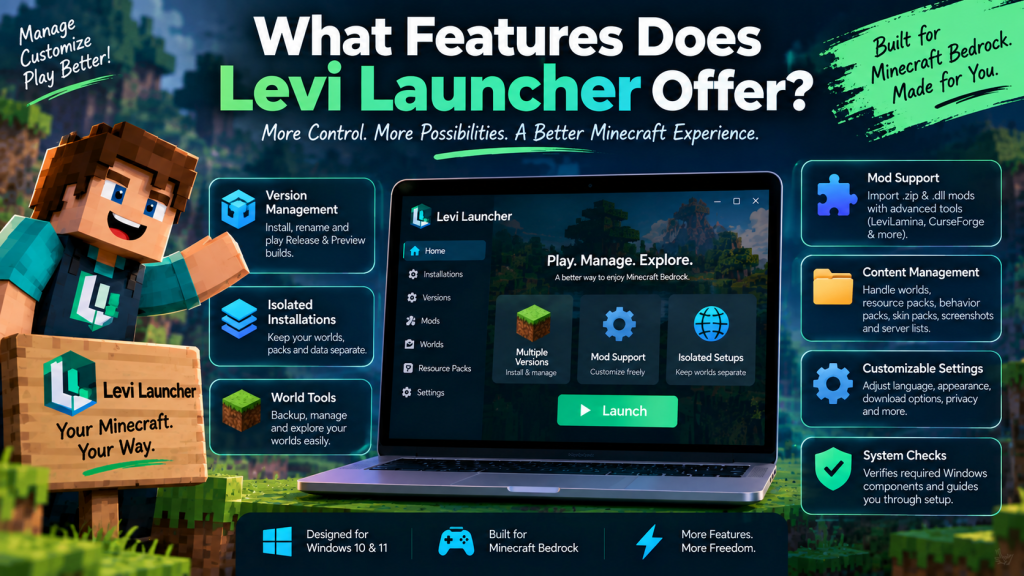
Levi Launcher offers a collection of useful tools designed specifically for Minecraft Bedrock Edition players on Windows. Instead of simply opening the game, it helps users manage Minecraft versions, organize content, create isolated environments, work with mods, and control multiple installations from one convenient desktop interface.
For anyone who frequently switches between Minecraft Release and Preview builds or experiments with customized setups, Levi Launcher provides considerably more flexibility than a basic launch button. Understanding its main features can help you decide whether the launcher matches the way you play, test, and manage Minecraft Bedrock.
Flexible Minecraft Version Control
One of the strongest features of Levi Launcher is its version-first management system. Users can install, rename, launch, and remove supported Minecraft Bedrock Release and Preview builds directly from the application.
This is particularly useful for players who do not want to depend on a single Minecraft version. A stable Release build can be kept for regular gameplay while a separate Preview installation is used for testing upcoming features.
Why Multiple Versions Are Useful
Having different versions available in one interface can save time and reduce the need to repeatedly replace a main installation.
This setup can be especially useful for players who need different Minecraft builds for:
- Regular survival gameplay
- Preview testing
- Mod compatibility
- Resource pack testing
- Experimental configurations
For users who switch frequently between versions, centralized management can make the overall experience much more organized.
Separate Minecraft Environments With Isolation
Levi Launcher also includes an isolation feature that helps keep different Minecraft installations separate from each other.
When isolation is enabled, a particular version can use its own workspace instead of mixing worlds, packs, and related game files with the default Minecraft AppData environment.
Keep Experimental Setups Separate
This can be valuable for players who regularly experiment with mods or Preview versions. For example, one clean installation can be used for everyday gameplay while another environment is reserved for testing.
Keeping setups separate can also make troubleshooting easier because problems in one environment are less likely to become mixed with another installation.
Isolation does not replace backups, however. Important Minecraft worlds should still be copied to a safe location before major changes.
Built-In Content Management Tools
Managing Minecraft content is another area where Levi Launcher goes beyond simply starting the game.
Its available management tools include support for:
- Worlds
- Resource packs
- Behavior packs
- Skin packs
- Screenshots
- Server lists
These features allow users to manage commonly used Minecraft content from one organized location instead of manually searching through multiple Windows folders.
Easier Organization for Custom Content
Players who maintain many worlds, packs, or custom configurations can benefit from having these items easier to access and organize.
This can be especially helpful for content creators, testers, and experienced players who regularly move between different Minecraft setups.
Support for Mods and Advanced Tools
Modding is another important feature available through Levi Launcher. The launcher can work with supported .zip and .dll mods and provides additional workflows for more advanced Minecraft Bedrock setups.
It also supports tools and services such as CurseForge-oriented content flows, LIP, and LeviLamina.
Test Mods Carefully
Mod compatibility can vary depending on the Minecraft version being used. A modification that works with one Release build may not behave the same way with another version or a Preview build.
For that reason, users should avoid assuming that every mod will work everywhere. Starting with a clean installation and adding modifications gradually can make compatibility problems easier to identify.
Recent releases have also improved validation of imported mod files, helping reduce problems caused by invalid packages replacing existing mods.
Helpful Tools for Managing Worlds
Levi Launcher includes dedicated world utilities that can make Minecraft save management easier.
Users can export world backups, inspect world information, and modify selected level.dat fields directly through the launcher.
Protect Important Minecraft Progress
Backup functionality is particularly valuable for players who experiment with game versions, mods, or custom configurations.
Minecraft worlds can contain months or even years of progress, so keeping reliable copies is an important part of maintaining a safe setup.
The project has also introduced an experimental backup and restore workflow for launcher instances, giving advanced users additional options when managing more complex environments.
Settings That Give Users More Control
Levi Launcher provides several settings that allow users to adjust how the application behaves according to their preferences.
Players can configure areas such as:
- Language
- Appearance
- Download behavior
- Privacy preferences
- Update channels
- Component status
This makes the launcher adaptable to different types of users. Someone focused mainly on stable gameplay can keep the setup simple, while experienced players can adjust more advanced options.
Accessibility and Language Options
Recent development has also expanded language support and improved accessibility for keyboard and screen-reader users.
These changes help make the launcher easier to use for a wider range of players while still keeping advanced management options available.
Automatic Checks for Important Windows Components
Levi Launcher does more than manage Minecraft versions. During the first launch, it can also check whether important Windows components are available.
These checks may include:
- Microsoft Gaming Services
- Microsoft GameInput
- Minecraft Bedrock GDK access
- Other required system components
If something important is missing, the launcher can provide setup guidance before users begin creating managed Minecraft installations.
Why Component Checks Matter
Missing Windows components can cause installation, startup, or launching problems. Identifying these issues early can make troubleshooting much easier.
Instead of discovering a problem after setting up several versions, users can address basic system requirements before continuing.
Designed Specifically for Bedrock Players
Unlike general gaming platforms that manage many unrelated titles, Levi Launcher focuses specifically on Minecraft Bedrock Edition on Windows.
The project supports Windows 10 and Windows 11 and requires users to own a legitimate licensed copy of Minecraft Bedrock Edition.
A Focused Minecraft Management Tool
This specialized approach allows the launcher to concentrate on features that are directly useful to Bedrock players, including:
- Version management
- Content organization
- Mod support
- World tools
- Isolation
- System checks
Rather than functioning as a universal game library, Levi Launcher is designed around the specific needs of Minecraft Bedrock users.
Who Benefits Most From These Features?
Levi Launcher can be useful for both regular and advanced Minecraft players, but users who frequently experiment with different setups are likely to benefit the most.
Players who regularly switch versions, test Preview builds, use mods, manage many worlds, or work with multiple packs can take advantage of its broader management tools.
Casual and Advanced Users
Casual players may only use a small part of the launcher’s functionality, such as version management or world organization.
More advanced users can take advantage of isolated installations, mod tools, backups, component checks, and customization options to build a more controlled Minecraft environment.
Conclusion
Levi Launcher offers much more than a simple way to start Minecraft Bedrock Edition. Its features include Release and Preview version management, isolated installations, content organization, mod support, world utilities, customization options, system checks, and tools for managing more advanced Minecraft environments.
Levi Launcher is therefore especially useful for Windows users who frequently experiment with different Minecraft versions, mods, packs, or separate setups. Casual players may only need a few of its features, while advanced users can use its wider management toolkit to keep Minecraft organized, flexible, and easier to maintain.